Wednesday - Students will create graphs to chart their learning throughout the trimester. Students will post reflections and goals for further learning.
Using your data that you have been given by your teachers, chart your learning. Place it in the appropriate page.
Explain what the data means and what you have learned so far in each class.
Create 1 goal for each class and post them on your home page.
Students will understand the importance of their digital footprint. Students will be able to reflect on their digital footprint. Students will be able to use appropriate vocabulary when discussing technology.
vocabulary review
work on Digital footprint unit - see rubric for everything that you need. Check web site for directions on how to complete the different components of the unit.
if no computer or you get done, work on the crossword
Create a folder in your "technology" folder titled "digital footprint"
What is your digital footprint? Using your digital devices log, your digital footprint survey, and your digital footprint visual, write a 5-6 sentence paragraph about what types of media creates your digital footprint.
list all of the sites, and digital devices you have listed so far in this unit.
When you are done, create your "wordle". You can change the colors around once you are done. Remember that these will be printed in black and white, so be mindful of the colors you choose (try to have a white background.)
Hit the "print" button at the bottom of the wordle image.
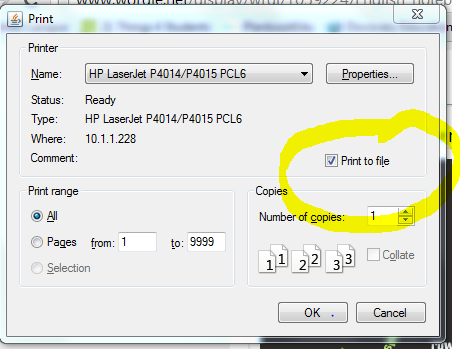
DO NOT PRINT THIS. You will check the box. "Print to file" (see picture)
Save this document as "your login ID_digital footprint" (ex: trose_digital footprint)
Upload this document to Google Docs and move it to your digital footprint folder
Next to the "create" button in Google Drive, you will see an arrow pointing up. Click on it.
Select the document you just saved. When done, share it with me so I can print it for you.
Drag the digital footprint document into your digital footprint folder in your technology space on Google Drive
What is a "digital dossier"? - watch video below
Using Google Docs - create a document titled "Digital Footprint Reflection". Write a reflection answering the following questions.
When do you think that your digital presence started? (look at your survey if you need to)
Google "Martin Luther King, Jr." Now, Google yourself. (Use quotation marks (" ") to get a more accurate search.) What did you find? Was the information accurate?
Look at all the digital footprint visuals we created. If that was all the information that someone had to look at you with, what would they think about you?